How does the order agent work?
Who answers at each moment, when the agent hands a conversation to you, and what you need to do in “Need help”.
The order agent looks after your customers on WhatsApp: it answers questions, quotes from your price tables and, once the customer confirms, records the order. Whatever it cannot solve, it hands to a person on your team.
One idea is enough to understand how it behaves: every conversation has three actors, and at any given moment only one of them owns the thread.
All of this works in full on channels with the Sales and orders template. See Channel use templates and, further down, “What changes with each template”.
The three actors
| Who | Writes from | |
|---|---|---|
| The agent | The artificial intelligence that looks after the channel | Lolos |
| The salesperson | You or anyone on your team | The Lolos Inbox or the phone linked to the channel |
| The customer | The person writing to you on WhatsApp | Their WhatsApp |
For Lolos, what you send from the Inbox and what you type directly on the channel's phone are the same thing: a message from a salesperson.
The three states of a conversation
| State | When it happens | Does the agent answer? | Does it show in “Need help”? |
|---|---|---|---|
| The agent is handling it | The normal state | Yes | No |
| Waiting for a salesperson | The agent handed it off and nobody on the team has written to the customer yet | No | Yes: “Asked for help”, and “Wrote again” if the customer keeps writing |
| A salesperson is handling it | Someone on the team wrote to the customer | No | When the customer answers you: “Replied to you” |
The agent is handling it
The agent answers on its own. It hands the conversation to a person when:
- the customer confirmed after receiving the full quote;
- the customer asks for something the agent can't answer;
- the customer asks for something custom (a logo, embroidery);
- or another reason you set in its instructions applies.
When it hands off, the agent:
- Records the order in your orders table, when it applies.
- Pauses itself in that conversation, so it stops answering.
- Lets you know: the conversation shows up in “Need help” with the reason, a short sentence such as “customer confirmed they want to close the purchase of 3 jackets”.
Before handing off it can ask the customer for some details so you arrive prepared, such as the company's name or tax ID. You set that on the agent: see When the agent hands off.
The agent cannot say it passed the conversation to you without actually doing it. If its reply claims something like “I already passed you to a salesperson” without handing off, Lolos discards that reply and asks it to really hand off or to say something else. That's the No promete derivar sin derivar condition (“doesn't promise a handoff without doing it”), on for every agent.
Waiting for a salesperson
The customer is waiting for a person. Meanwhile:
- The agent doesn't answer them: the conversation is paused.
- If the customer writes again, the conversation stays in “Need help”, now as “Wrote again”, with their latest message.
- If the Remind if nobody answers within time passes (2 hours with the template) and nobody has written, Lolos reminds you once (below, in “The reminder”).
- The agent does not come back on its own here: it won't pick up a conversation it handed off precisely because it couldn't solve it.
A salesperson is handling it
As soon as someone on the team writes to the customer, the conversation belongs to that person:
- The agent doesn't answer that customer. That way it doesn't get in the way of what you're sorting out.
- When the customer answers you —a file you asked for, a confirmation, a question— the conversation shows up in “Need help” as “Replied to you”, with what they sent. If they sent a file, you also see a description of its contents.
When the agent comes back depends on how the conversation reached you:
| How it reached you | When the agent comes back |
|---|---|
| You wrote without the agent having handed off | On its own, once Leave the thread to the team member for passes (24 h with the template) since your last message |
| The agent handed it off | The conversation was paused: it comes back when you click Resume agent, or on its own if the channel has Put the agent back on after and that much time passes with no messages. The template doesn't set it |
So when you're done with a customer the agent handed you, click Resume agent if you want the agent to look after them again.
The “Need help” tab
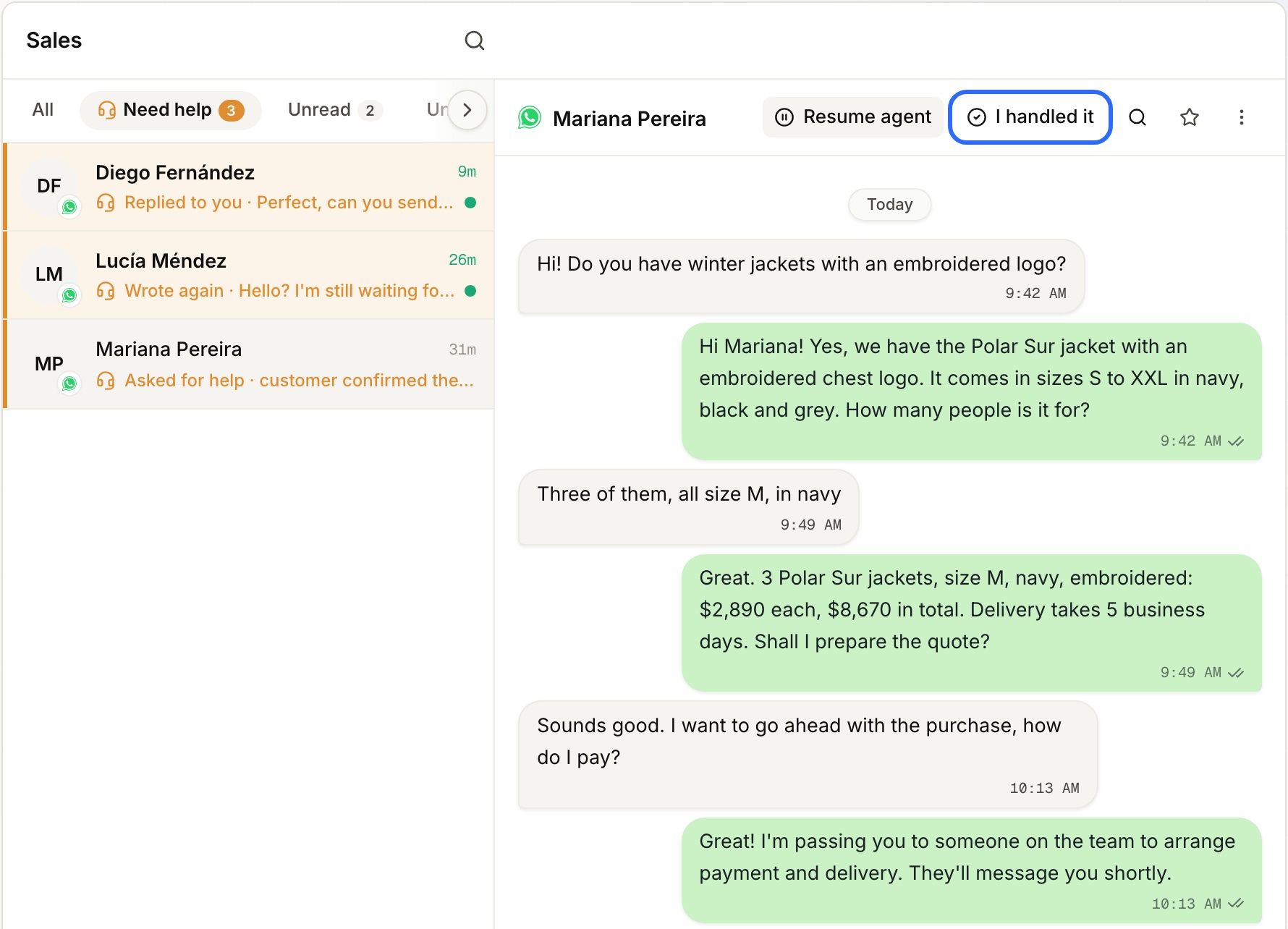
It's in the Inbox, next to All, and gathers every conversation where a customer is waiting for a person. The whole team shares the list: whatever one person handles leaves the list for everyone.
| Label | What it means |
|---|---|
| Asked for help | The agent handed off the conversation. The reason is shown next to it |
| Wrote again | The agent handed off, nobody has written yet and the customer sent another message |
| Replied to you | The customer answered in a conversation a salesperson is handling |
When it leaves the list
- When someone on the team writes to the customer, from the Inbox or from the channel's phone. Opening the conversation isn't enough: seeing it isn't handling it.
- When someone clicks Resume agent.
- When someone clicks I handled it.
I handled it is for when you sorted it out some other way —a phone call, in the store—. It's at the top right of the conversation, next to Pause agent, and only shows while the conversation is in “Need help”.
Note: I handled it doesn't turn the agent back on. The conversation stays paused, because having dealt with the customer and deciding the agent should take them back are two different decisions. If the customer writes again, it comes back to the list as “Wrote again”. To give it back to the agent, click Resume agent.
The alert
Every time a conversation enters “Need help”, Lolos shows an alert at the bottom of the screen, with a sound and —if you turned them on— a browser notification:
- 🙋 The agent asked for help, 🙋 Replied to you or 🙋 Wrote again;
- the customer's name and their message or the agent's reason;
- the Open conversation button.
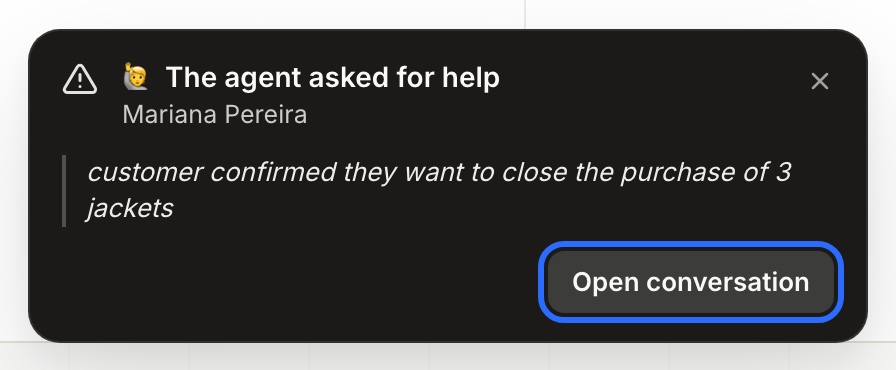
The alert doesn't close on its own. If there are several, they stack with +N pending handoffs. If the customer writes again in a conversation that was already alerted, the alert updates without sounding again.
The reminder
If a conversation sits in “Need help” for the time set in Remind if nobody answers within without anyone writing to the customer, Lolos shows an alert: “Waiting for 2 h” (with the hours you set), with the customer's name, the last thing they wrote —or the agent's reason— and a button to open the conversation.
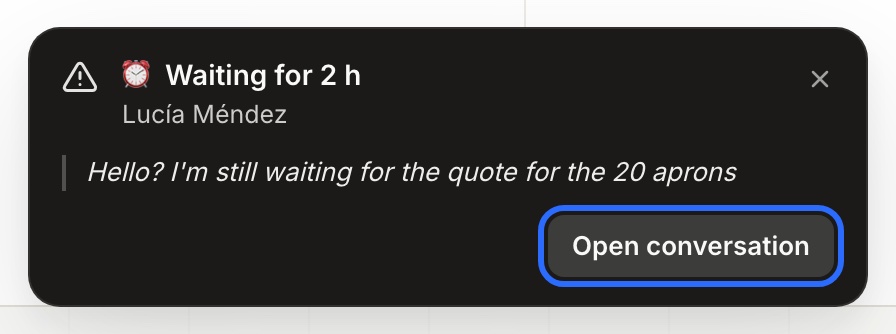
- It shows at the bottom of the Lolos screen, to everyone on the team with access to that channel. If you turned on browser notifications, you get one too.
- It's only visible with Lolos open in the browser. It doesn't arrive by WhatsApp, email or on your phone. If nobody has Lolos open at that moment, the alert shows as soon as someone opens it.
- It fires once per wait. If the customer writes again, a new wait starts and, if it still goes unanswered, you're reminded again once that time passes.
- The Sales and orders template sets it to 2 hours. If you leave the setting empty, there's no reminder.
Pausing, resuming and stopping the agent in a chat
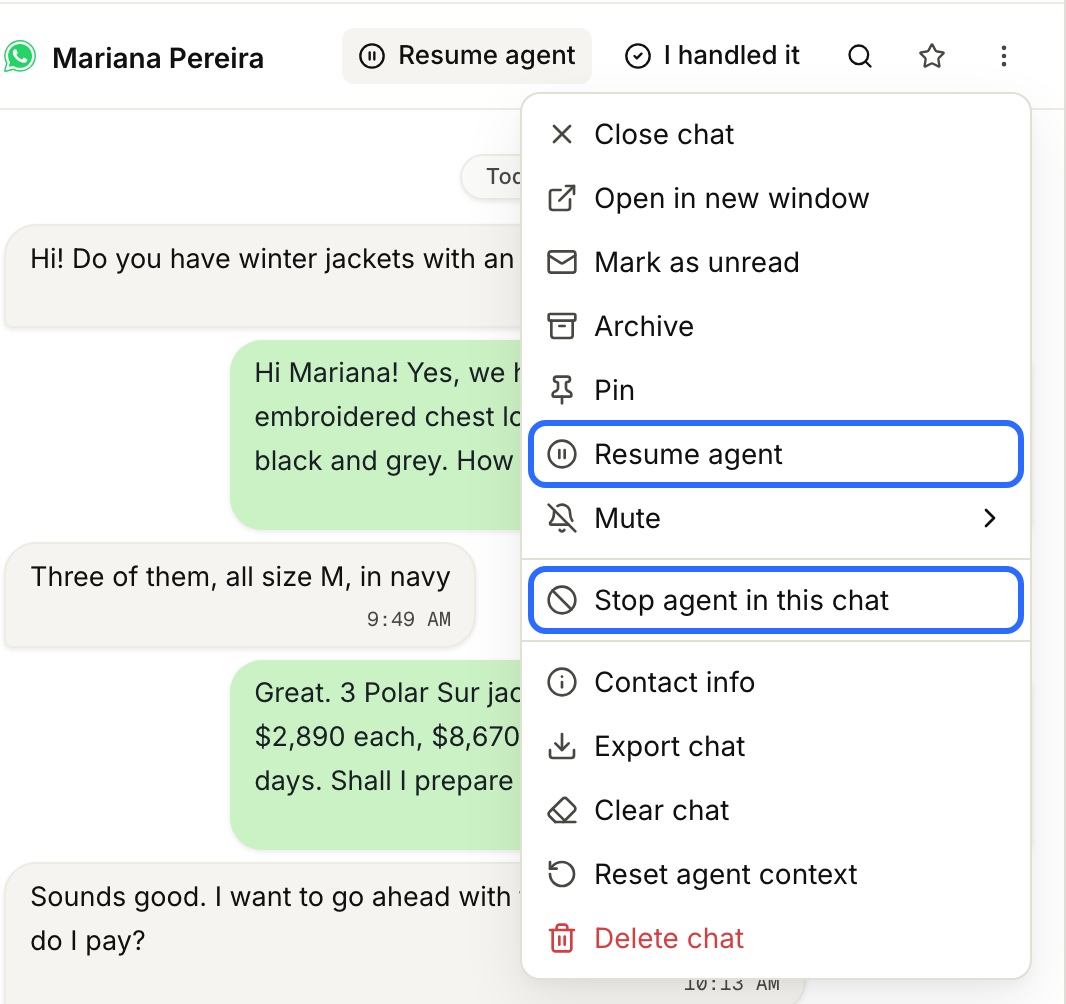
At the top of each conversation, and in the chat's ⋮ menu:
| Action | What it does | Until when |
|---|---|---|
| Pause agent | The agent stops answering that customer | Until you click Resume agent, or until Put the agent back on after passes with no messages |
| Resume agent | Gives the conversation back to the agent right away, and takes it out of “Need help” | — |
| Stop agent in this chat | The agent never answers that customer again, on that channel | Until you click Reactivate agent in this chat. It doesn't come back on its own |
Stop is for a contact the agent should never look after: a supplier, a relative, a teammate. A stopped contact doesn't raise “Need help” alerts. If you know them in advance, the owner can add them under Edit channel → Agent stopped in these chats.
Who can do what
| Owner | Member | |
|---|---|---|
| See “Need help” and answer the customer | ✅ | ✅ (on the channels they can see) |
| Pause, resume or stop the agent in a chat | ✅ | ✅ |
| I handled it | ✅ | ✅ |
| Choose the channel's template and times | ✅ | — |
| Change when the agent hands off | ✅ | — |
What you set up on the channel
To open Edit channel: in the sidebar, under Channels, hover over the channel and click ··· → Edit channel. Only an owner sees it.
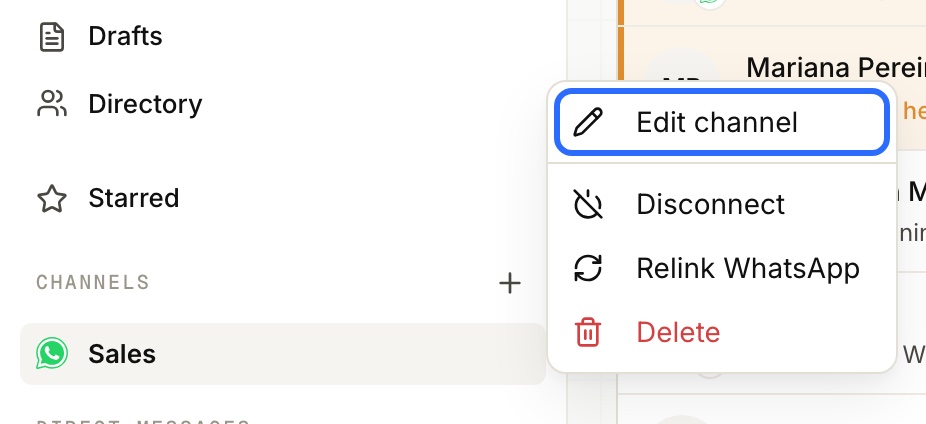
The quickest way is to apply the Sales and orders template from Edit channel → Channel use. Afterwards you can adjust each value by hand.
Under Edit channel → Handing off to people:
| Setting | What it does |
|---|---|
| Leave the thread to the team member for | How many hours, since the last message from someone on the team, the agent stays quiet in that conversation. It's also what turns on “Replied to you” and “Wrote again”: empty, the agent answers anyway and only “Asked for help” exists. The template sets it to 24 |
| Remind if nobody answers within | How long a contact can wait in “Need help” before you're alerted again, once. Empty: no reminder. The template sets it to 2 |
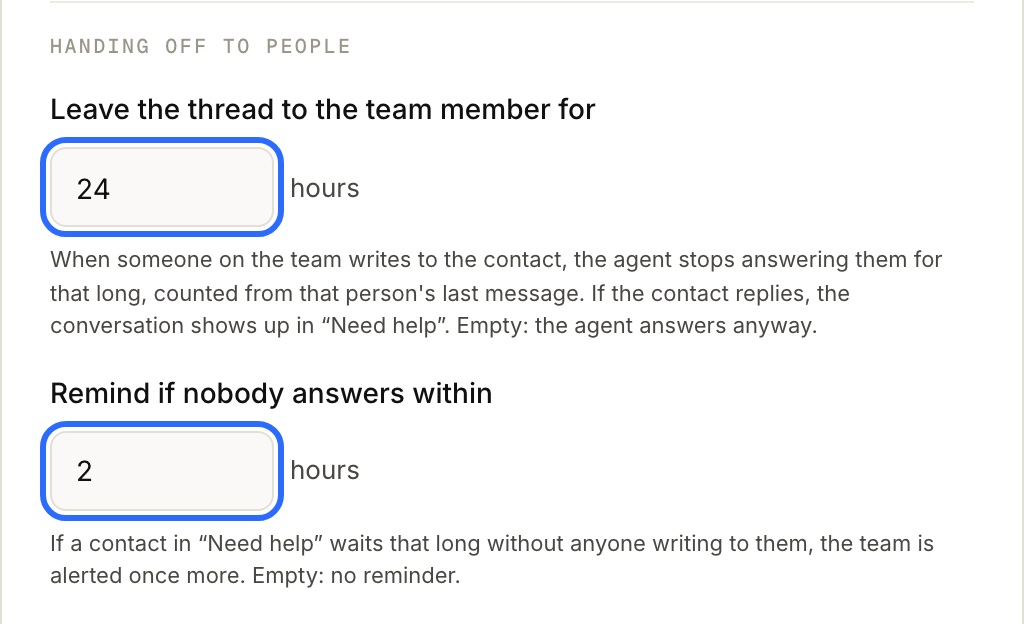
Under Edit channel → Conversation follow-up:
| Setting | What it does |
|---|---|
| Put the agent back on after | How many hours without messages before a paused conversation goes back to the agent. It doesn't apply to handed-off conversations nobody has handled yet |
| Flag it if the customer does not reply within | How long our last message can go unanswered before the conversation moves to the Unattended tab, labeled The customer never replied |
| Stop flagging it as unattended after | How long it stays in Unattended before becoming a normal chat again |
What changes with each template
| Just connect | Sales and orders | |
|---|---|---|
| The agent hands off and the conversation shows as “Asked for help” | Yes, if the agent has the Derivar a una persona (hand off to a person) tool | Yes |
| The agent steps aside when someone on the team writes | No | Yes, 24 h |
| “Replied to you” and “Wrote again” | No | Yes |
| Reminder | No | Yes, at 2 h |
Many agents can hand off even when the channel is on Just connect. In that case Channel use tells you so and suggests applying Sales and orders.
In short
- The agent answers until it hands off or until someone on the team writes.
- If you write, the agent steps aside. When you stop writing, it comes back on its own.
- If the agent handed off, the conversation stays paused until you resume it.
- Every customer waiting for a person is in “Need help”, until someone writes to them.