When the agent hands off
Why the agent passes a conversation to you, how to have it ask for details first, and how to require conditions —all or any— before it hands off.
When the agent hands off, it pauses itself in that conversation and puts it in “Need help” so someone on the team takes over (see How does the order agent work?). This guide explains when it does it and how to control that.
All of this is set on the agent, and only an owner can change it.
Some of these screens are still only in Spanish, even with the interface in English: we quote their labels in Spanish, with a translation.
Why it hands off
The agent uses the Derivar a una persona (hand off to a person) tool. Out of the box it uses it when:
- the customer confirmed after receiving the full quote;
- the customer asks for something the agent can't answer;
- the customer asks for something custom (a logo, embroidery).
Every handoff carries a reason: a short sentence you see in “Need help”, such as “customer confirmed they want to close the purchase of 3 jackets”.
You can add your own reasons in the agent's Instructions, in plain words: “If they ask about an overdue invoice, hand off to a person”.
Asking for details before handing off
So you arrive prepared, the agent can ask the customer for some details before passing you the conversation. It takes two parts:
- In the Instructions, tell it what to ask. For example: “Before handing off, ask the customer for the company name and tax ID (RUT). If they don't have one, they should say so”.
- If you want it to be mandatory, turn on the Requiere RUT (requires tax ID) condition (below). Then the agent can't hand off until the reason includes the tax ID or says the customer has none.
A message like “I'll pass you to a salesperson. Could you send me the company's name and tax ID?” is allowed: it announces the handoff while asking for the details.
Where to set it up
- In the sidebar, under Agents, click ··· (Manage agents) and open the agent.
- At the very bottom, open Advanced settings (Tools, conditions, and rules).
There are three parts:
| Part | What it's for |
|---|---|
| Tools | What the agent can do. Derivar a una persona is in the Conversation group: if you turn it off, the agent never hands off |
| Condiciones de las herramientas (tool conditions) | What has to be true before the agent uses a tool. That's what this guide covers |
| Reglas personalizadas (custom rules) | The organization's own rules to block or allow actions. For specific cases |
A channel can also trim tools for that channel only, under Edit channel → Tools. The Sales and orders template makes sure Derivar a una persona is enabled.
The handoff conditions
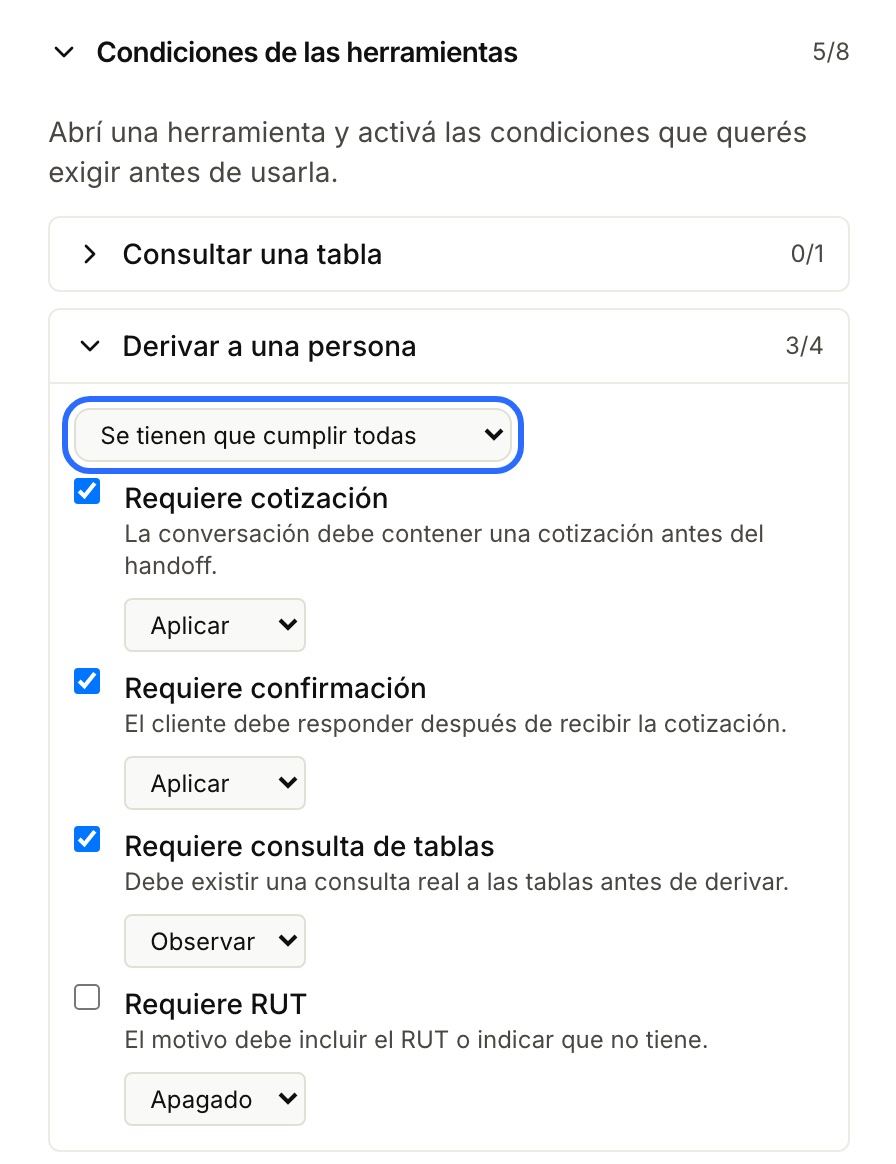
Under Condiciones de las herramientas, open Derivar a una persona. Each condition has a checkbox to turn it on and a mode.
| Condition | What it requires before handing off |
|---|---|
| Requiere cotización (requires a quote) | That the conversation has a quote. The agent must have sent a block titled «Cotización estimada»: if your instructions call it something else, the condition won't recognize it |
| Requiere confirmación (requires confirmation) | That the customer replied after receiving the quote |
| Requiere consulta de tablas (requires a table lookup) | That the agent actually looked up your tables (for example, the price list) before handing off |
| Requiere RUT (requires tax ID) | That the handoff reason includes the customer's tax ID or says they have none |
The modes
| Mode | What it does |
|---|---|
| Apagado (off) | The condition isn't checked |
| Observar (observe) | It's evaluated and logged internally, but doesn't stop anything. Use it to try a condition before requiring it |
| Aplicar (enforce) | If it isn't met, the agent doesn't hand off |
All or any
Above the Derivar a una persona conditions there's a selector:
- Se tienen que cumplir todas (all must be met, the default): the agent hands off only if every condition in Aplicar is met.
- Alcanza con que se cumpla una (any one is enough): the agent hands off as soon as any of them is met.
Two examples:
| You want… | Set up |
|---|---|
| Only sales that are ready to close: quoted, confirmed and with a tax ID | Requiere cotización, Requiere confirmación and Requiere RUT in Aplicar, with Se tienen que cumplir todas |
| The customer as soon as they confirmed a quote or left their tax ID | Requiere confirmación and Requiere RUT in Aplicar, with Alcanza con que se cumpla una |
Click Guardar condiciones (save conditions) for it to take effect.
What the customer sees when it isn't met
Nothing odd. The handoff doesn't happen, nobody gets an alert and the agent carries on: Lolos tells it what's missing, and the agent asks the customer for it —the tax ID, the confirmation— or sends the quote.
If the agent tries to hand off twice in the same reply and both are stopped, the third goes through anyway: it's better to get a customer with one detail missing than to leave them stuck with nobody looking after them.
“No promete derivar sin derivar”
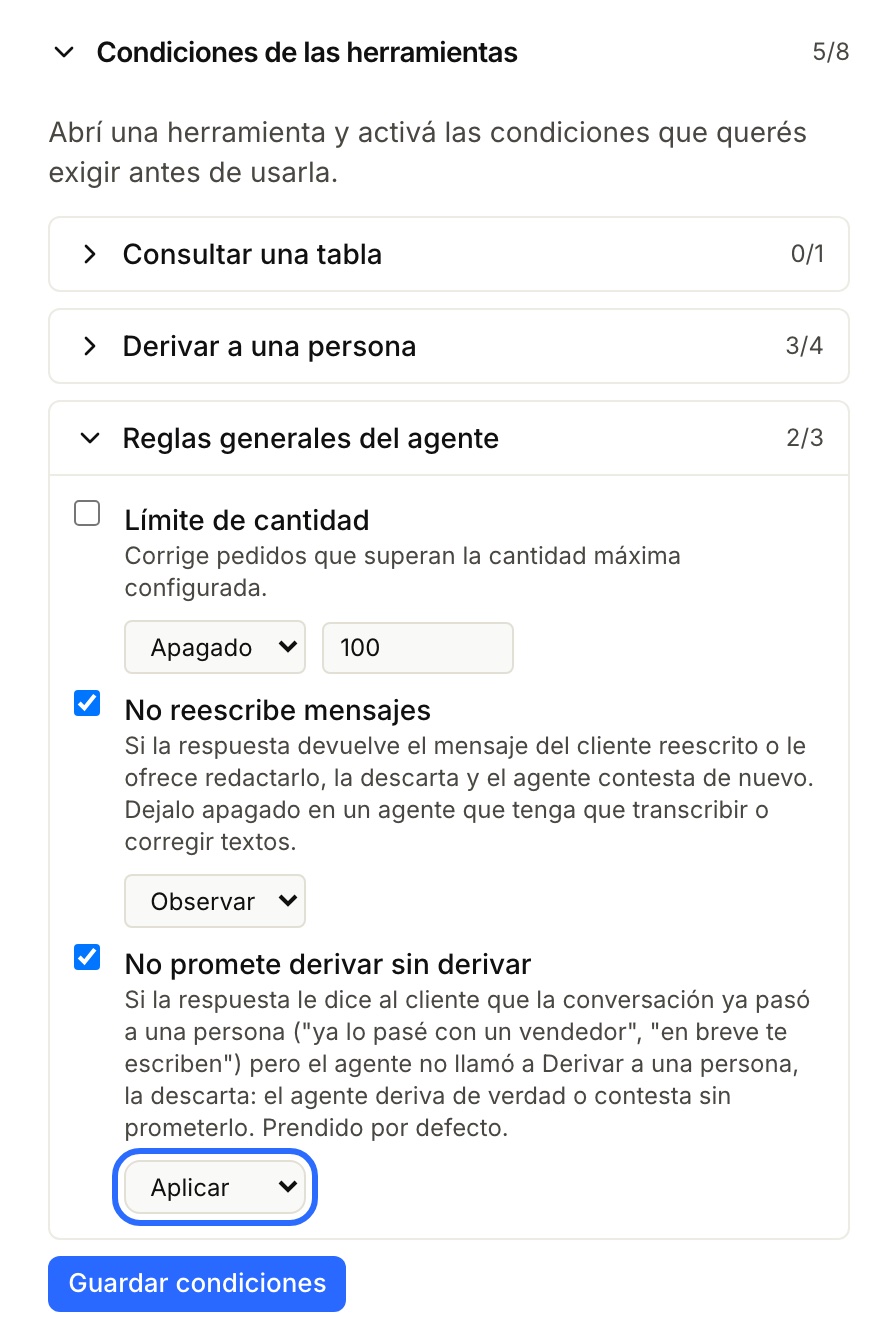
“Doesn't promise a handoff without doing it” is under Condiciones de las herramientas → Reglas generales del agente (the agent's general rules) and is set to Aplicar on every agent.
If the agent tells the customer it already passed them to a person —“I already passed you to a salesperson”, “someone will write to you shortly”— without actually handing off, Lolos discards that reply and asks it to really hand off or to say something else. That way no customer is left waiting for someone who was never told.
It doesn't stop:
- a message that announces the handoff while asking for details (“I'll pass you to a salesperson. Could you send me your tax ID?”);
- a question or offer (“Would you like me to pass you to a salesperson?”).
We recommend leaving it on Aplicar.
The other general rules
| Rule | What it does |
|---|---|
| Límite de cantidad (quantity limit) | Corrects orders above a Cantidad máxima (maximum quantity, 100 by default) |
| No reescribe mensajes (doesn't rewrite messages) | If the agent sends the customer their own message rewritten, or offers to draft it for them, it discards that reply and answers again. Leave it off on an agent that has to transcribe or correct texts |
Before you change anything
- Try a new condition in Observar for a few days before moving it to Aplicar.
- If you require Requiere cotización, check that the agent's instructions send the «Cotización estimada» block.
- If the channel is on Just connect, the agent can still hand off if it has the tool. To get the reminder and “Replied to you”, apply Sales and orders (see Channel use templates).